

Mosaic’s Data Store for Testing and Automated Regression (DSTAR™)
Test Data Management for Cost-Effective Manual and Automated Testing
Protected by U.S. Pat. No. 8,677,320
- What Is DSTAR?
DSTAR™, Mosaic’s Data Store for Testing and Automated Regression, is a central repository for creating, maintaining, and managing your reusable input and expected results test data. DSTAR™ solves an industry problem ignored by other testing tools — the managed creation, linking and maintenance of the test data needed by your manual and/or automated tests. DSTAR™ interfaces as an add-on to HP Quality Center or through Mosaic’s Reusable Software Testing and Automation Repository, RSTAR™.
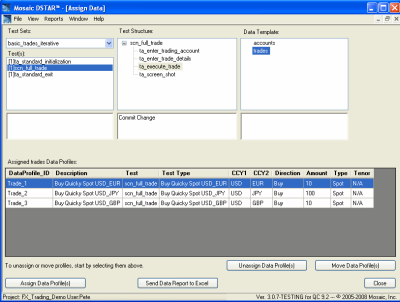 DSTAR™ eliminates premature binding of test data to tests by managing the test data as reusable assets in a database. This enables Full Reuse™ of all your testing assets: tests, scripts and the test data facilitating:
- Test cases that are easy to maintain and reuse!
- Control of dynamic and hard to manage test data!
- Automation you can maintain and manage!
The cost savings can be substantial.
- Why DSTAR
Why DSTAR™?
How do you manage your input and expected results test data now?
- MS Excel Data Sheets?
- Data tables or parameters embedded in your scripts?
- Ad hoc data created for each execution?
While these approaches may reflect current industry practices, they are very inefficient and ignore the significant reuse potential of test data. When test data is created for specific test(s), the result is duplicate, redundant data that is difficult to maintain.
Today’s test automation frameworks claim reuse with data-driven or keyword-driven approaches. Yet these reusable assets are then bound to non-reusable test data killing their reusability.
There is a better way to manage your test data -- DSTAR™
Why Test Data Management?
The inability to manage and maintain test data is the main reason automated and manual regression test beds fail. Test data is complex, prone to change and plagued with sensitivity issues. Most testing approaches, including HP Quality Center (QC), bind data to the tests too early. This limits reusability and significantly increases the costs to maintain and manage the test data. DSTAR™ tackles these issues by decoupling the data from the tests and by managing the data in a database environment where it can be readily managed and controlled.
DSTAR™ interfaces with a wide variety of tools. Our QC version interfaces as an add-on to HP Quality Center. Other tool interfaces are available through Mosaic’s Reusable Software Testing and Automation Repository (RSTAR™) or simply through our DLLs. By managing the test data as reusable assets in a database and delaying binding to tests until execution, DSTAR enables the reusability of your manual and automated tests and allows these assets to be shared and easily maintained.
DSTAR™ supports data import, maintenance and assignment manually or through API’s. It also includes an integrated test automation framework and management reporting. The automation framework supports direct automation of the manual tests, eliminating the rework inherent in most automation approaches. The management reporting provides visibility into test condition coverage and test data usage not available with MS Excel and QC data tables.
- Features
DSTAR™ Key Features
- DSTAR™ Organizes Your Test Data as Logical Datasheets in a Database
- Manage your test data as a testing asset
- Add, change or delete test data at anytime
- Organize and reuse test data
- Maintain test data centrally and share it across testers
- Check In/Check Out and APIs facilitate maintenance to keep data in sync with your test databases
- DSTAR™ Imports Test Data
- Import data from MS Excel workbooks
- Format test data extracts from your test databases for import
- DSTAR™ Tracks and Maintains Test Data Assignments
- Assign available test data to your tests
- View the test data assigned to a test
- Modify test data assignments any time prior to test execution
- Easily iterate tests by assigning multiple sets of data
- DSTAR™ Provides Reporting to Manage Your Tests and Test Data
- Identify where test data is used
- Identify test data not in use
- Generate reports of the tests and their currently assigned data for manual execution or for reviews/audits
- DSTAR™ Comes with a Complete Test Automation Framework
- Automate your manual tests by coding action scripts for reusable test actions
- Use Mosaic’s Master Control Program (provided with DSTAR™) to execute your automation tests with the data assigned through DSTAR™
- Generate robust execution reports
- Retain the ability to manually execute and review your tests even after automation
- DSTAR™ Includes a Comprehensive Process for Reusable Test Planning
- Design tests to be reused across testers
- Design tests to be directly automated
- Organize test data for sharing and reuse across testers, tests and automated scripts
- Benefits
The benefits of using DSTAR™ include:
- Lower costs and reduced time to market
- Lest test data to develop and maintain since the data is fully reusable at the row level
- The ability to design test data around needs of the application, not the needs of a specific test.
- Improved visibility into conditions being tested
- Ability to know where specific data conditions are tested and which data conditions are not tested
- Lower costs and reduced time to market
©2009-2014 Mosaic, Inc.